Your data, entered once and right everywhere.
We connect the systems a company runs on: the ERP (the system behind orders, inventory and accounting), the accounting software, the bank, bill-pay, CRM and shipping tools, and the spreadsheets holding them together. Where information arrives as a PDF or an email, AI reads it into those systems. Everything is checked on the way in, so most mistakes are caught before they reach your books, and your people approve anything that matters. We’re based in Fresno and work with companies across Fresno, Clovis and the Central Valley, and remotely anywhere in the US.
When people are the connection between your systems. An integration is worth a look when the same information is typed by hand every day, and a mistake in it is expensive.
- Supplier invoices and customer orders arrive as PDFs and emails, and someone types each one into the ERP.
- Month-end and year-end need overtime or temporary staff just to get the entries in.
- Payments from the bank are matched to invoices by hand.
- A wrong date, quantity or amount isn’t caught until a customer or an auditor finds it.
- Shipments are tracked in a spreadsheet, and a late one is a surprise.
- A weekly report means exporting from three systems and stitching spreadsheets together.
- One spreadsheet runs a critical process, and only one person understands it.
AI that reads your documents. A lot of retyping starts with a document: a supplier’s invoice, a customer’s purchase order, a remittance email, a request for a quote. AI is now good at reading those, whatever the layout. We pair it with checks against your own records, so it never acts on a guess.
Supplier invoices into the ERP
What the AI does
Reads each invoice from the inbox or a PDF, the header and every line, whatever the supplier’s layout.
What your systems and people do
Matched to the purchase order and receipt, checked for duplicates and for changed bank details, then posted, or sent to your accounts payable team with the reason it stopped.
Customer purchase orders into sales orders
What the AI does
Reads the customer’s PO from an email or PDF and matches their part numbers to yours.
What your systems and people do
Prices and quantities are checked against your price list and stock, a draft sales order is created, and a rep approves it before it’s confirmed.
Remittances into cash application
What the AI does
Reads remittance emails and PDFs and works out which invoices a payment is meant to cover.
What your systems and people do
Matched to the bank deposit and the open invoices within limits you set. Anything short, over or unclear goes to a person before the payment is applied.
Quote preparation
What the AI does
Reads a request for quote, with its specs and notes, and drafts a one-page summary and a starting quote.
What your systems and people do
Your estimator reviews it, sets the price and sends it. The AI never sets a price or sends anything to a customer.
How each one works
- 1Arrives by email, folder or portal
- 2AI reads only the fields needed
- 3Checked against your records
- 4Exceptions go to a person, with the reason
- 5Written to your system, without duplicates
- 6Every step logged
These are examples of the kind of workflow we build, not past client projects. If plain rules can do the job without AI, we’ll build it that way and tell you why.
How we make AI trustworthy. AI reads the paperwork. Your systems check it, and your people approve anything that matters. This is what that means in practice.
Only the access the work needs
You create the accounts and keys we use, scoped to the job, and you can switch them off at any time. We never ask for your passwords.
Your accounts, your keys
Wherever possible, the workflows and the AI service run under accounts in your company’s name and are billed to you, so you see every charge and keep everything if we part ways.
Business AI services only
We use business-tier AI from providers like Anthropic, OpenAI, Microsoft Azure, Google and AWS, never free or consumer apps. Under those terms the major providers don’t use your data to train their models by default. Before work starts, we name in writing each service your data will pass through.
Only what the task needs is sent
The AI reads the invoice, not your whole vendor file. Bank account numbers and personal details are left out or masked wherever the task allows.
People approve the risky steps
Payments, deletions, anything sent to a customer, and anything the system isn’t sure about wait for a person on your team, with a plain reason.
Every step is logged
For each document we record what came in, what the AI read, what the checks found, what was written and who approved it. You can look up any entry later.
AI providers keep some request data for a limited time, often up to 30 days, to watch for abuse. Where a provider offers zero data retention or US-only processing for your use, we’ll explain what it involves and set it up if you want it. We don’t take on projects involving patient health information.
The systems we connect. Most projects join two or three of these. If yours isn’t listed, ask: anything with an API or a reliable export can usually be connected.
What system integration covers
- Accounting and banks
- QuickBooks Online, QuickBooks Desktop (with more limits), Xero, and your bank’s feeds and exports
- Sales and payments
- Shopify, Square, Stripe, your website's forms and checkout
- Customers
- CRMs such as HubSpot, Salesforce and Zoho, and the spreadsheets that stand in for one
- Operations
- ERP, inventory and order-management systems, warehouse and shipping software, and the in-house tools that run your operations
- Scheduling
- Online booking tools, Google Calendar and Outlook calendars
- Office
- Google Workspace (Sheets, Drive, Gmail) and Microsoft 365 (Excel, Outlook, SharePoint)
- Messaging
- Text and email services, messaging apps and social media platforms
- AI services
- Business-tier AI from providers like Anthropic, OpenAI, Microsoft Azure, Google and AWS, in your company’s own accounts wherever possible
- Everything else
- Public and private APIs, databases and file exchanges
Typical connections
Examples of the kind of flow an integration handles. Yours are mapped and priced on the first call and in your proposal.
Supplier invoices into the ERP
Customer POs into sales orders
Bank payments matched to invoices
What every integration includes. Automation only helps if it’s easy to use and you can trust it, so the safeguards are part of the build, with or without AI.
Checks on every record
Each record is checked against your own data before it’s written, such as the purchase order, the price list or the open invoice, so a wrong date, amount or quantity is caught on the way in.
Access you control
We work through accounts or API keys you create and can revoke, never your own login, and read-only access while we map and test.
Failures that get caught
Anything that fails waits in a queue for a person, with a plain reason. Retries are built so they don’t create duplicate records, and a status screen shows what moved and what didn’t.
Tested on your own documents
Each workflow is tested against agreed cases and a sample of your real documents, in a sandbox or test copy wherever the systems offer one, and you see the results before you accept it.
A watched launch
Switched on with your real data, monitored for the first two weeks, with handover notes and training for your team.
90 days of fixes
Anything that doesn’t work as the plan describes is fixed at no charge for 90 days after launch.
A free diagnosis on the call, then one workflow at a time. You know what each workflow will do, and the price, before anything is built.
- 1
A free diagnosis call
Walk us through how an invoice, an order or a payment gets from where it arrives to where it’s recorded, who handles it and how long it takes. We put rough numbers on it with you, and tell you plainly where AI helps and where plain automation is enough.
- 2
A fixed-price proposal
If there’s a fit, you get a written proposal: the workflows, what each one reads, checks and writes, the milestones and one fixed price. Most engagements run three to four months.
- 3
Proven one workflow at a time
The first milestone confirms access and tests the first workflow on a sample of your real documents in a safe copy. Each workflow after that is shown working before you accept it.
- 4
Launch, then Run and Monitor
We switch each workflow on with you and watch it closely at first. An optional monthly plan keeps it running, tests AI model updates before they reach you, and reports what was processed and caught.
What we’ve connected before. Past work is confidential, so we describe it by the kind of system instead.
It has included banks, bill-pay platforms, ERPs, client management platforms, AI services, public and private APIs, and messaging platforms, with most of it in finance: invoices, payments and the records that have to match across systems. SyntheFi, our own product, shows the same kind of work in the open, including how we build AI with guardrails.
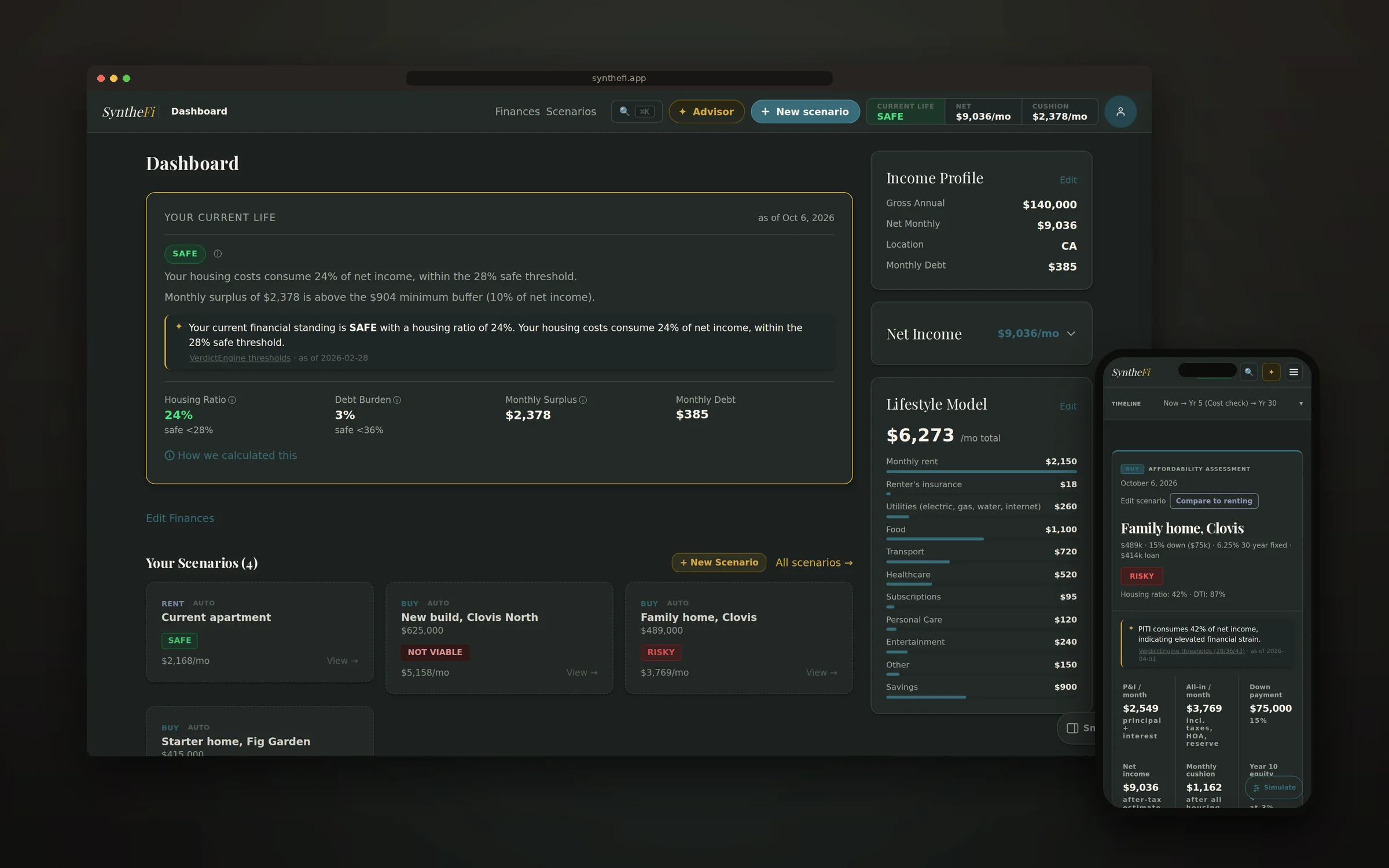
Our own product: a home-affordability decision engine
SyntheFi
SyntheFi connects to Stripe for checkout and billing through verified webhooks, to four government data sources that a nightly job refreshes, and to Claude for an AI advisor that has to call SyntheFi’s own calculation tools and cite a source for every figure. Every AI call’s cost is logged, and a daily spending ceiling alerts an admin.
Questions we get asked. About system integration, AI, and what happens after launch.
How much does a custom integration cost in Fresno?
Every integration is fixed-price, and there is no hourly billing. The free first call works out where information is retyped and what that costs. If there’s a fit, you get a written proposal with the workflows, the milestones and one fixed price, paid in milestones. AI usage is billed by the provider straight to your own account, so you see every charge.
Is our data safe with AI?
We set it up so you can check. You create the accounts we use, with only the access the work needs, and can switch them off at any time. We use the business versions of AI services, where the major providers don’t train their models on your data by default, and we name each one in writing before we start. The AI only sees the fields a task needs, and every step is logged. Providers do keep some request data for a limited time to watch for abuse; where zero retention is available for your use, we can set it up.
What if the AI gets something wrong?
Sometimes it will, and anyone who promises a hundred percent isn’t being straight with you. That’s why it never acts alone. Your systems check what it read: does this PO exist, does the price match, have we seen this invoice before. Anything that fails, or that it isn’t sure about, goes to a person with the reason. Before a workflow is switched on, it’s tested on a sample of your real documents and you see the results.
Will this replace our staff?
That isn’t the goal, and we don’t promise it. The goal is taking the retyping off your team’s plate so they spend their time on the work that needs judgment, and month-end stops needing overtime or temps.
We tried ChatGPT and it didn’t really work. Why is this different?
A chat window can read one document, but someone still has to check it, copy it and type it into the right system. What we build is narrow, connected to your systems, checked against your records and logged, and it handles the volume without anyone copying and pasting. It also runs on business terms, which free AI apps often don’t.
Can you connect our ERP to our bank, bill-pay or CRM?
Usually, yes. Most ERPs, accounting systems, banks, bill-pay platforms and CRMs have a documented way to connect or a reliable export, and older systems can often be reached through their database or file exchange. The first milestone confirms what each of your systems allows before the bulk of the build, and if one can’t take the data, we agree another workflow in its place.
We run a critical process on a spreadsheet. Is that an integration?
Usually, yes. A spreadsheet like that is often a homemade integration: one person holding several systems together by hand. We look at it alongside the systems around it, and the fix is the same kind of work, with the rules written down and the checks built in. Often it needs no AI at all.
Why not use Zapier or a ready-made connector?
If an off-the-shelf connector or a no-code tool does the job, we’ll tell you, and it’s often the cheapest answer. A custom integration makes sense when the rules are specific to your business, when accuracy matters, as it does with money and inventory, or when a failed step has to be caught and retried without creating duplicates.
Do you need our passwords?
No. We use accounts or API keys that you create and can revoke at any time, never your own login. While we map and test we only need read-only access, and we test in a sandbox or a copy of each system wherever one exists.
What happens when one of the systems changes?
Software vendors update and sometimes retire their services. For 90 days after launch we fix anything that doesn’t work as the plan describes. Changes caused by a vendor are quoted as a change, or covered by the optional Run and Monitor plan, which includes monitoring, alerts and fixing breakages caused by third-party updates.
Do we have to do all of this over email?
No. Calls are welcome, by phone, video or in person. We go through the questionnaires with you rather than sending them off, and record interviews with your permission so nothing gets missed. You work with the same developer from the first call to launch.
Do you only work with businesses in Fresno?
No. We’re based in Fresno and glad to meet in person anywhere around Fresno, Clovis and the Central Valley, and we work with companies anywhere in the US by phone and video.
Tell us what gets typed twice.
Name the systems you use and where information gets retyped. We’ll tell you whether an integration or an AI workflow makes sense, and what it would take.